Chapter 3 - Tutorial Mode
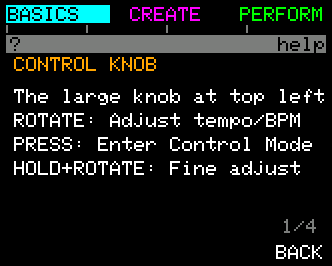
Tutorial Mode is UNA's built-in guided walkthrough of BASIC. It runs in eight chapters: Getting Started, Chords, Suggest & Listen, The Melody, Patterns, Recording, Chord Chains, and Keyboard & Finish. Each step shows a card to read, then asks you to do something on the real screen, with the buttons you don't need greyed out.
The walkthrough covers BASIC (BASIC mode). A walkthrough for EXPERT is still to come.
Starting and coming back
- The first time: choose TUTORIAL on the SELECT MODE screen (BASIC mode). It switches to BASIC and starts at Getting Started.
- Any time later: hold the CONTROL Knob and press HELP (button 6) on any screen, then TUTORIAL (button 1) on the help card. On Home, TUTORIAL is button 1 of that same held-CONTROL row.
Once you have finished the walkthrough, it opens on the Contents screen, so you can go straight to the chapter you want.
The bar at the right of the title band shows how far through the walkthrough you are.
Reading a card
| Button | What it does |
|---|---|
| JUMP TO (button 1) | Opens the Contents screen, to go to another chapter. |
| EXIT (button 3) | Asks whether to leave the tutorial (see Leaving, below). |
| BACK (button 4) | The previous page, or the previous step. Greyed when there is nothing to go back to. |
| NEXT (button 6) | The next page. On the last page it closes the card, and you do the step. |
The channel steps
Getting Started finds your keyboard and your synth:
- Keyboard: play a note so UNA can hear which channel your keyboard sends on. CONFIRM (button 6) lights once it has heard one. No keyboard? Press NO KEYS (button 4). Later steps then show you routes that don't need one, using Suggest and ready-made chord chains.
- Output: turn the CONTROL Knob to try each channel. UNA plays a note on it, so you can find your synth. CONFIRM (button 6) lights once you have tried one; BACK (button 4) returns to the keyboard step.
Contents
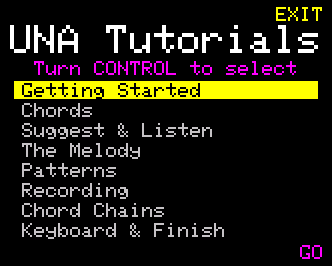
| Control | What it does |
|---|---|
| Turn the CONTROL Knob | Choose a chapter. |
| GO (button 6) | Start that chapter. |
| EXIT (button 3) | Leave the tutorial. You go back to Home, with SELECT MODE up. |
Leaving
EXIT asks EXIT THE TUTORIAL?, with the note What you made stays: anything you built during the walkthrough is kept.
- NO (button 4) - stay where you were.
- YES (button 6) - leave, back to Home.