Chapter 13 - Metronome & Timing
Tempo, time signature, and metronome - determining the playback speed and audible guidance during recording.
Tempo
UNA's tempo range is 1-300 BPM, with a default of 120 BPM.
Tempo is a device-wide setting, so stays put as you switch patches. There's only one tempo for the whole unit; every track and Modulator runs against it.
Setting tempo on the unit
Tempo lives on PARAMETER Knob 1 as its secondary parameter. So the gesture is:
- Press-and-rotate PARAMETER Knob 1 to change tempo.
This works from anywhere the standard track-parameter behaviour is active. The display shows the new BPM value as you rotate.
Setting tempo from an external source
External MIDI clock.
With MIDI Clock set to IN (Chapter 17), UNA's tempo follows whatever your DAW or drum machine is sending. Your local tempo edits are ignored while external clock is present.
Time signature
UNA supports four time signatures: 4/4, ¾, 2/4, and 6/8. 4/4 is the default.
Time signature is a device-wide setting.
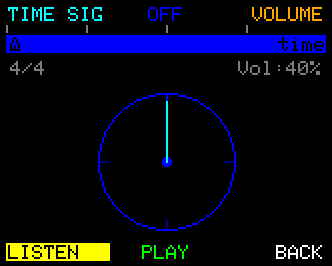
The time signature affects how UNA groups steps into bars - how the metronome click accents downbeats, where the position bar on the display shows its major divisions. However, it does not impact the number of steps an individual track plays per bar, this is independently set by the Track's Time parameter.
Change the time signature from the Metronome page (Chapter 6):
- From Home, press MIXER (button 3), tap the CONTROL Knob for Advanced Mode, then press METRO.
- Press TIME SIG to arm the setting.
- Rotate the CONTROL Knob to step through the four options.
- Press TIME SIG again to deselect (or BACK to leave).
The metronome click
UNA's metronome plays audible clicks through the built-in piezo buzzer on the unit. It's a hardware feature - no separate audio output required - and it's independent of the MIDI outs, so the click stays in the room without leaking into your recording. The first beat of the bar is accented.
- From the Metronome page, press ON / OFF (button 2 - the same button you pressed to get here). The button lights while the click is on.
Count-in and recording
The Record pages, across UNA, all offer a METRO toggle inside their pre-record screens.
Turn it on and UNA gives you a one-bar count-in click before recording starts; useful for playing in time without needing the main click running all the time.
If the sequencer was stopped when you pressed START, the tracks stay silent during the count-in and come in from the top on the downbeat. If it was already running, they keep playing.
This record-metronome toggle is its own setting, separate from the main metronome, and it's remembered across all the record screens. Switching it on before a take doesn't leave the main click running afterwards.
External clock - how UNA follows
When MIDI Clock is set to IN (Chapter 17), UNA follows external MIDI clock. A few things happen:
- The tempo display reflects the incoming clock - you don't need to match it manually.
- Your Knob 1 press-and-rotate tempo edit is ignored while external clock is present.
- UNA takes clock from whichever source starts sending first (USB-C, USB Host, or TRS In). Others are ignored until the active source goes silent.
Chapter 16 covers the full external sync behaviour, including Start / Stop / Continue handling and multi-device routing.
If external clock disappears
UNA doesn't have a dedicated watchdog for external clock loss. If the master stops sending clock mid-play, UNA continues at its last-received tempo until Stop arrives or you press Stop manually. That means a briefly-glitched clock won't derail UNA, but a dead master will leave UNA running at the frozen tempo - worth knowing if you're relying on your DAW.
Cross-references
- Chapter 6 - Metronome page access and the surrounding UI.
- Chapter 16 - External clock and Sync in detail.
- Chapter 17 - the MIDI Clock and MIDI Transport Globals (each IN / OUT / OFF).