The Surface
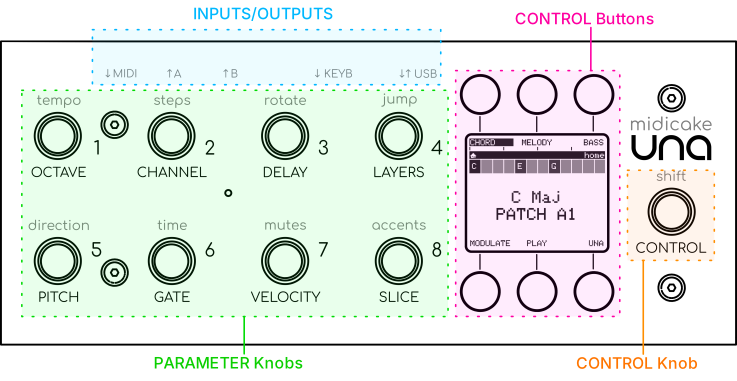
8 PARAMETER Knobs - endless encoders, two layers each: rotate = primary parameter, press-and-rotate = secondary. That's how 8 knobs reach 16 parameters per track. 1 CONTROL Knob - navigation; quick press on Home opens Performance Mode. 6 CONTROL buttons - context-sensitive; the label on screen is always right. → Manual Ch 4 - Anatomy
The six gestures
| Gesture | What it generally means |
|---|---|
| Press a button | Do the thing named on screen. |
| Hold a button | A second, related action - e.g. hold PLAY / STOP for a Panic Stop. |
| Rotate a knob | Change a value; on the CONTROL Knob, move a selection. |
| Press and rotate a knob | The knob's secondary parameter. On CONTROL: a mode-specific alternate. |
| Hold CONTROL + rotate a PARAMETER Knob | A temporary edit - moves while held, snaps back on release. Shown in yellow. |
| Hold a PARAMETER Knob + rotate CONTROL | A staged edit - dialled in, shown in purple, commits when you release the knob. |
Also: in the Mixer, hold CONTROL + press button 1-3 (SOLO) to solo a track. Menu → BIOS opens BIOS. → Manual Ch 22 - Appendix G
The colour language
Chord · Melody · Bass · Modulation · Record / Stop · Play · Temporary edit · Staged edit
A colour can do more than one job; read it together with the label on screen. → Manual Ch 4 - The Colour Language